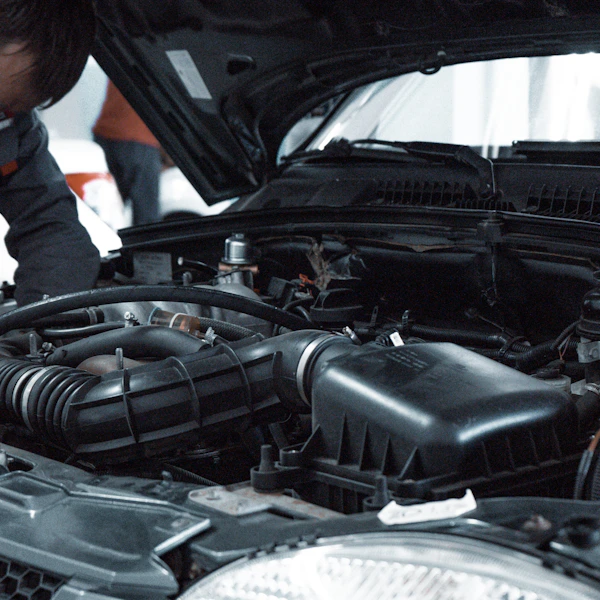
Auto Repair Shop Software

Boost Your Profits. Fill Every Bay.

Auto repair shop software that fills your bays and boosts profits. Online booking, digital inspections, customer reminders, and shop management — all in one platform.

20+ YEARS
experience
FULL SERVICE
auto shop operations and marketing platform
SHOP OWNERS
built this service for you
Auto repair shop software dashboard
20+ YEARS
experience
FULL SERVICE
auto shop operations and marketing platform
SHOP OWNERS
built this service for you
🔔
2 min
Average booking time
📊
100%
ARO boost made possible
🏎️

Shop Management

Dashboard, technician board, bay optimization, inventory & job clocks.
👥

Customer Management

CRM, automated outreach, review generation & loyalty programs.
📅

Appointment Scheduling

Online bookings, Google Maps integration, reminders & waitlists.
🔍

Digital Inspections

Photo-based MPIs, customer approvals, and ARO-boosting reports.
📊

Analytics & Reporting

Revenue dashboards, performance metrics & declined-work recovery.
✍️

Digital Authorizations

Digital estimates, invoicing, signatures & integrated payments.
🔧

Smart Jobs

Automates RO setup with job recommendations from appointment details.
🌐

Custom Auto Repair Website

Free custom website built for your shop with online booking integration.

Auto Repair Shop Software for both Marketing and Operations

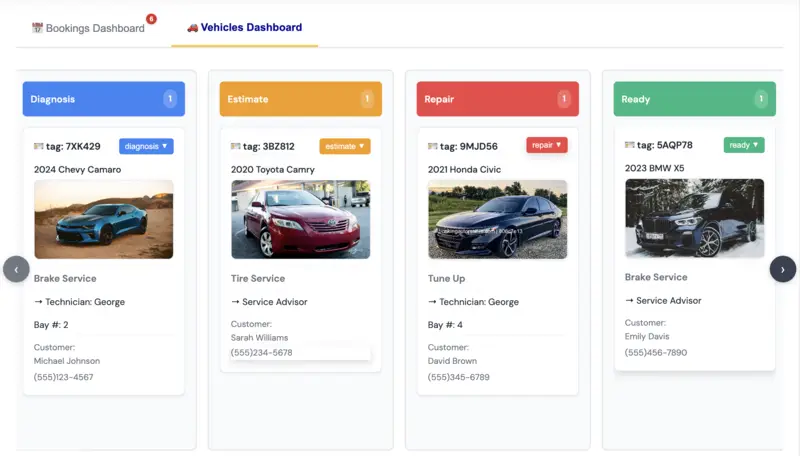
Shop Dashboard Overview

Manage your entire automotive shop operation from our intuitive dashboard. Track appointments, monitor vehicle status, and optimize your workflow in real-time.

Shop Dashboard Interface
💻

Real-time Management

Track appointments, vehicle status, and technician assignments in real-time

📊

Analytics & Insights

Get detailed insights into your shop performance and revenue metrics

💡

Smart Workflow

Intelligent vehicle pipeline management with drag-and-drop functionality

technician productivity software

Technician Productivity Software for Auto Repair Shops

Transform your auto repair shop's efficiency with our comprehensive technician productivity software. Streamline operations, reduce downtime, and maximize revenue.

⚡

Faster Job Completion

Reduce time spent on administrative tasks and focus more on actual repairs with automated scheduling and tracking.

📊

Performance Tracking

Monitor technician performance in real-time with detailed metrics and identify opportunities for improvement.

🔄

Optimized Workflow

Eliminate bottlenecks with intelligent job assignment and resource allocation based on technician availability and skills.

Read Our Guide on Technician Productivity Software

AI-Powered Innovation

AI Auto Repair Service Advisor

Automate customer communications, generate estimates, and improve customer satisfaction with intelligent AI assistance. Save time and increase revenue with AI-powered service advisor tools.

📝

Summarize Technician Notes

AI automatically converts detailed technician notes into clear, customer-friendly summaries.

💬

Customer-Friendly Explanations

Transform technical jargon into plain language that customers can understand, building trust.

🔧

Maintenance Recommendations

AI analyzes vehicle history and mileage to suggest relevant maintenance services.

📱

Text Message Automation

Automatically generate personalized text messages for appointment reminders and service updates.

📋

Estimate Descriptions

Generate professional, detailed estimate descriptions that clearly communicate service value.

📈

Smart Upsells

Identify relevant upsell opportunities based on vehicle history, increasing ARO by up to 25%.

Learn More About AI Service Advisor

Scheduling Software to Automate Appointment Booking

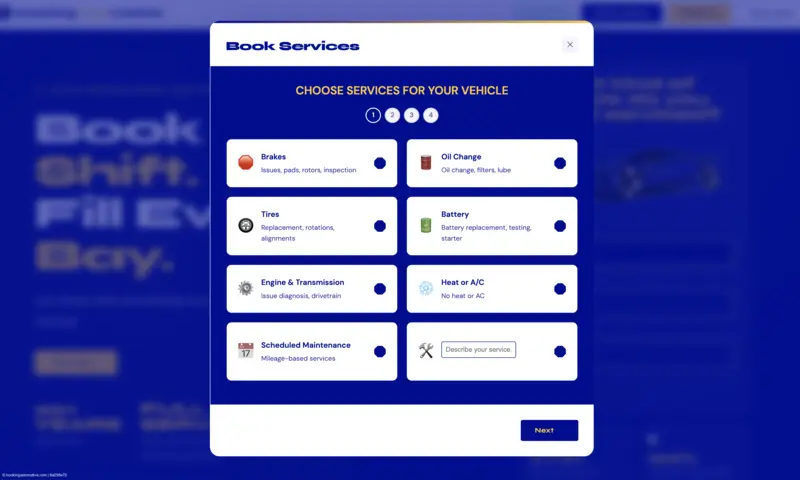
Appointment Scheduling System Overview

Automate your auto repair shop's appointment scheduling process with our comprehensive booking system. Manage appointments, track service status, and optimize your workflow in real-time.

Appointment Scheduling System Interface
📅

24/7 Appointment Scheduling

Schedule appointments, track service status, and manage technician assignments in real-time

🎨

Custom Branding & Color Match

Customize the booking page with your shop's logo, colors, and branding for a seamless customer experience

📱

Book from Any Device

Book appointments from any device — desktop, tablet, or mobile phone

🗺️

Book from Google Maps or Your Website

Book appointments directly from Google Maps or your shop's website

🔔

Automated Reminders

Reduce no-shows with automatic text and email reminders sent to customers before their appointments

🔄

Calendar Sync

Sync appointments with Google Calendar, Outlook, and other popular calendar apps to keep your team aligned

NEW FEATURE

Digital Vehicle Inspection Software

Auto Repair Software now offers a digital vehicle inspection tool. Create professional inspections with photos, notes, and customer approval workflows.

📸

Photo Documentation

Add unlimited photos to each inspection with annotations and descriptions

✅

Customer Approval

Send inspections to customers for instant digital approval via SMS or email

💰

Increase ARO

Shops using digital inspections see 25-40% higher average repair orders

Why Choose

auto repair software

The complete solution designed specifically for independent auto repair shops

💰

ZERO Setup Fees

Get started immediately without any upfront costs or hidden charges

💎

$300 Value for Only $99

Get premium features worth over $300 at just $99 per month

📱

Works Anywhere

Access your shop from any device - desktop, tablet, or mobile

🔄

CRM + Operations

Complete solution handling both customer relationships and shop operations

⚡

Instant Setup

Start booking customers in minutes, not weeks or months

🎯

Built for Shops

Specifically designed for independent auto repair shops like yours

Simple, Transparent Pricing

Add-Ons
Level Up
with affordable options

Only pay for what you need...

  • ✓Custom Auto Repair Website
  • ✓Parts Integration
  • ✓Automated Payment System
  • ✓QuickBooks Integration
  • ✓AI Agent

Parts, Stock & Purchasing

Inventory & Vendor Management

Stop losing hours to parts runs and shrinkage. Track every part, compare vendor pricing, and reorder automatically so the right part is always on the shelf when the car hits the bay.

📦

Live Parts Inventory

Track on-hand counts per location in real time. Know exactly what's on the shelf before promising a repair — no more mid-job parts runs.

🏷️

Vendor Price Comparison

Compare part pricing across your vendors before ordering. Buy from the cheapest source and protect your margin on every repair order.

🔔

Low-Stock Alerts & Auto-Reorder

Set minimum levels on fast-moving parts and get alerted — or auto-generate purchase orders — before you ever run out.

🧾

Purchase Orders Built-In

Create, send, and receive purchase orders without leaving the platform. Parts received are reconciled to inventory automatically.

Show, Don't Tell

Digital Vehicle Inspections

Customers approve work they can see. Send visual inspections to their phone, get approvals in minutes, and turn recommended repairs into booked revenue.

📷

Photo & Video Inspections

Technicians capture photos and video of every finding — brakes, tires, leaks — so customers see exactly what you see.

✅

Phone-Based Approvals

Customers review the inspection on their phone and approve work with a tap. No phone tag, no waiting at the counter.

📈

Higher Average Repair Order

Shops see $100–$200 more per ticket when customers approve work they can see instead of work they have to trust.

🔁

Declined Work Follow-Up

Inspections customers declined are saved automatically, so follow-ups go out with the photos attached — recovering revenue that used to walk out.

Write-Ups on Autopilot

Smart Jobs — Automated RO Setup

Smart Jobs automates repair order setup end to end. By the time the customer drops the keys, the RO is already built — your advisors just confirm and go.

⚡

Automatic RO Setup

Smart Jobs builds the repair order the moment an appointment is created — customer, vehicle, and complaint pre-filled before the car arrives.

🔧

Canned Jobs & Labor Times

Attach canned job templates with labor times and parts lists. Advisors quote common services in seconds instead of typing the same job all day.

👨‍🔧

Smart Tech Assignment

Jobs are matched to the right technician based on skill and bay availability, keeping every tech on billable work.

⏱️

Less Counter Time

Advisors spend minutes per write-up instead of a quarter hour — more time selling, less time typing.

Approvals & Payments

Digital Authorizations & Invoicing

Kill the paperwork. Get signed authorizations digitally, send invoices instantly, and let customers pay from their phone — so pickup is a handshake, not a checkout line.

✍️

Digital Authorizations

Customers e-sign approvals for estimates and added work from anywhere. Every signature is timestamped and stored on the RO.

🧾

Instant Invoices

Convert approved work to a clean digital invoice in one click — parts, labor, tax, and fees itemized automatically.

💳

Text-to-Pay

Send a secure payment link by text or email. Customers pay before pickup, so checkout takes seconds instead of minutes.

📂

Paperless Records

Authorizations, invoices, and payment history live on the repair order — searchable forever, with nothing to file or lose.

auto repair shop marketing ideas

How Auto Repair Shops Get More Customers in 30 Days

Learn how to automate your booking process and get more customers in our market guides and FAQ

Car Repair Market Intelligence

Access comprehensive market data and competitive insights for major automotive markets. Position your shop for growth with local market analysis.

Buffalo
NY
Market Analysis

Comprehensive market analysis for Buffalo automotive repair industry

  • ✓Buffalo market size and growth trends
  • ✓Competitive landscape analysis
  • ✓Average repair costs and pricing benchmarks
  • ✓Consumer behavior and demand patterns
View Buffalo Market Guide

What Shop Owners Say

★★★★★
4.9 / 5from independent auto repair shops
★★★★★
"Inventory and vendor management finally got our parts spend under control. We compare vendor pricing before every order and auto-reorder fast movers — we're saving about $800 a month on parts alone."
Mike — Mike's Auto Repair, Houston, TX
★★★★★
"Digital vehicle inspections changed everything. Customers see photos and video of the problem on their phone and approve work on the spot — our approval rate on recommended repairs jumped 60%."
Simon — Simon & Sons Auto Repair, Phoenix, AZ
★★★★★
"Smart Jobs builds the repair order before the car even hits the bay — vehicle, canned jobs, and labor times all pre-filled. My advisors get an hour of counter time back every day."
Gary — Independent Auto Shop, Buffalo, NY
★★★★★
"Digital authorizations and invoicing killed our paperwork. Customers e-sign the estimate and pay from a text link — pickup is a handshake now, not a checkout line."
Dana — Northside Auto Care, Columbus, OH

Join the independent shops growing with Auto Repair Software.

What Is Auto Repair Shop Software?

Auto repair shop software is a management platform that runs the day-to-day operations of an independent repair shop in one place. Instead of juggling phone calls, paper notebooks, and separate tools, shop owners use it to handle appointment scheduling, digital vehicle inspections, customer communications, repair orders, parts ordering, and technician dispatch. The goal is simple: replace the patchwork of sticky notes, whiteboards, and separate billing tools with a single system that every staff member can use from a computer, tablet, or phone.

Modern auto repair shop software goes beyond basic record-keeping. The best platforms combine operational tools with marketing and customer retention features so your shop doesn't just stay organized — it grows. Auto Repair Software adds marketing tools most platforms leave out: customers can book directly from Google Maps or your website, automated reminders reduce no-shows, review automation builds your online reputation, and declined-work follow-ups recover revenue that would otherwise walk out the door.

Key Features of Auto Repair Shop Software

When evaluating auto repair shop software, these are the core features that separate a useful platform from a glorified spreadsheet:

Online appointment scheduling lets customers book 24/7 from your website or Google Maps listing. Instead of playing phone tag, customers pick a time slot, select the service they need, and get an instant confirmation. Automated text and email reminders cut no-show rates from 25% down to 8% or lower, protecting your daily revenue and keeping bays full.

Digital vehicle inspections (DVI)replace paper checklists with photo-based reports that customers can review and approve from their phone. Technicians take photos of worn brake pads, leaky gaskets, or tire tread depth, attach them to the repair order, and send a text message with a one-tap approval link. Shops using digital inspections typically see a 30-40% increase in approved work because customers can see the problem with their own eyes instead of taking a service advisor's word for it.

Customer relationship management (CRM)tracks every interaction — visit history, vehicle mileage, recommended services, and communication preferences. When a customer is due for an oil change or a timing belt replacement, the software sends an automated reminder. This keeps customers coming back instead of drifting to a competitor, and it turns one-time visitors into lifelong clients.

Repair order management streamlines the flow from estimate to invoice. Service advisors build estimates with parts and labor pricing, customers approve digitally, technicians track time and parts used, and the final invoice generates automatically. No more re-entering data or losing track of parts orders.

Parts ordering and inventory connects directly to your parts suppliers so you can check stock and place orders without leaving the platform. Low-stock alerts prevent delays, and parts pricing matrices keep your margins consistent across every job.

Analytics and reporting give you real-time visibility into revenue, average repair order (ARO), technician productivity, bay utilization, and declined work. Instead of guessing whether your shop is performing well, you get dashboards that show exactly where you stand and where you can improve.

Benefits by Shop Type

Independent shops (1-3 technicians): The biggest win is time. Owners who used to spend 2-3 hours per day on scheduling, reminders, and paperwork get that time back. Online booking fills empty slots, automated reminders cut no-shows, and digital inspections boost ARO without hiring more staff. Most single-location shops see ROI within 2-3 months.

Growing shops (4-8 technicians):As you add bays and staff, coordination becomes the bottleneck. Auto repair shop software gives you a shared dashboard where everyone can see the day's schedule, which vehicles are in which bays, and what work is approved or pending. Bay optimization features balance workload across technicians so no one is idle while others are overwhelmed.

Multi-location shops: Centralized reporting across locations lets you compare performance, standardize pricing, and identify which shops need support. Customer records follow the vehicle, not the location, so a customer who visits your north shop can pick up service at your south shop without starting over.

How Auto Repair Shop Software Works

Most modern platforms are cloud-based, meaning you access them through a web browser or mobile app rather than installing software on a local server. This means your data is backed up automatically, you can access the system from any device, and updates happen seamlessly without IT support. Setup typically takes 1-2 days: you import your customer list, configure your services and pricing, and train your team on the basics. Most technicians and service advisors are productive within their first shift.

The software connects to external systems too — parts catalogs like NAPA and AutoZone, payment processors like Stripe, accounting tools like QuickBooks, and Google Maps for local booking integration. These integrations eliminate double data entry and keep everything in sync.

Pricing and ROI

Auto repair shop software typically ranges from $49 to $399+ per month depending on features and number of users. Entry-level plans cover basic scheduling and customer management, while professional tiers add inventory, analytics, and marketing automation. The key is comparing total cost of ownership — some platforms charge extra for marketing modules, per-user licensing, setup fees, and implementation, which can push the real monthly cost well above the advertised price.

For independent shops, the result is measurable: higher average repair orders, better bay utilization, and less time spent on administration. Most shops see $8,000-$25,000 in additional monthly revenue from reduced no-shows, increased bookings, higher retention, and recovered declined work. Learn more in our ultimate guide to auto repair shop software or compare options in our best auto repair shop software roundup.
Best auto repair software for small business

Small auto repair businesses — the independent shops with 1-5 technicians where the owner is also the service advisor, parts runner, and sometimes a tech — have been underserved by the shop software industry for years. Most platforms are built for multi-location operations with dedicated IT staff and six-figure software budgets. They charge $300-$800/month with per-user fees that penalize you for hiring, add-on costs for features every shop needs (like SMS reminders), and annual price increases that reward the software company instead of the shop. Auto Repair Software was built differently. At $99/month flat with no per-user fees, no setup costs, and no add-on charges, it delivers the same core features as enterprise platforms at a fraction of the cost.

What makes it the best auto repair software for small business is that every feature is designed for the person standing at the service counter, not a systems administrator. Online booking with Google Maps integration captures local search traffic — the 70% of customers who search "auto repair near me" on their phones. Digital inspections with photos and videos boost ARO by $100-$200 per ticket because customers approve work they can see. Automated SMS reminders cut no-shows from 25% to under 10%, protecting revenue that small shops can't afford to lose. Declined work recovery automatically follows up on lost sales with inspection photos and booking links, recovering 30-40% of revenue that would otherwise walk out the door. Review automation builds your Google rating without awkward face-to-face asks. All of this is included — not sold as separate add-ons.

The pricing model is what truly sets it apart for small businesses. Tekmetric charges $279/month plus $49 per user plus $99 for SMS — a 4-user shop pays $574/month ($6,888/year). ShopMonkey charges $499/month. Auto Repair Software charges $99/month whether you have 1 technician or 10. Hiring a new tech doesn't increase your software bill. Adding SMS doesn't cost extra. The marketing suite (review automation, declined work recovery, customer reminders) is included, not sold separately. For a small shop doing $30,000-$50,000 in monthly revenue, the difference between $99/month and $574/month is significant — it's a technician's salary for 3 months, a new alignment machine, or your marketing budget for the year.

Setup takes 1-2 days, not 2 weeks. There's no server to install, no IT support required, and no 40-hour implementation process. Import your customer list from a spreadsheet, configure your services and pricing, and you're live by the end of day one. If you're switching from Tekmetric or ShopMonkey, we handle the entire migration for free — customers, vehicles, service history, pricing, and inventory — verified in 48 hours. You don't lift a finger. The ROI for a small shop is typically 20-50x the monthly cost: a shop paying $99/month that adds $3,000 in revenue from online booking and $2,000 from declined work recovery is getting a 50x return. Most small shops reach full ROI within 2-3 months.

Read the full comparison in our best auto repair software for small business guide or explore our ultimate guide to auto repair shop software.

Everything You Need to Grow Your Shop

36 answers covering SEO, Google Maps, increasing ARO, declined work recovery, bay optimization, and how to use autorepairsoftware.com to automate all of it.

SEO for Auto Shops Increase ARO Fill Every Bay Recover Declined Work Google Maps Booking Automate Follow-Up 5-Star Reviews Bay Utilization SEO for Auto Shops Increase ARO Fill Every Bay Recover Declined Work Google Maps Booking Automate Follow-Up 5-Star Reviews Bay Utilization
📊

Auto Repair Shop Management

Effective appointment scheduling requires a balance between maximizing capacity and ensuring quality service. Best practices include:

Buffer time: Schedule 15-30 minute buffers between appointments to account for delays and prevent cascading lateness.

Service time accuracy: Track actual vs. estimated service times for each service type and adjust your scheduling estimates accordingly.

Capacity management: Don't overschedule by more than 85% of your actual capacity to handle walk-ins and emergency repairs.

Waitlist utilization: Maintain an active waitlist for fully booked days and fill cancellations immediately.

Confirmation workflow: Send confirmations immediately after booking, 24 hours before, and 2 hours before to minimize no-shows.

Effective vehicle workflow management follows a clear progression and minimizes bottlenecks:

Standardized stages: Define clear stages (Scheduled → Arrived → Inspection → Repair → Ready → Picked Up) and stick to them consistently.

Technician ownership: Assign primary technicians to vehicles to ensure accountability and reduce communication gaps.

Visual management: Use a visible board or digital system to track vehicle status at a glance.

Daily standup: Start each day reviewing the current vehicle status and identifying potential bottlenecks.

Turnaround targets: Set and track targets for each stage (e.g., inspection within 2 hours of arrival, repair completion within 24 hours).

Digital inspections should be systematic, thorough, and customer-focused:

Standardized checklists: Use the same inspection format for every vehicle to ensure consistency and prevent missed items.

Photo documentation: Take photos of all findings, not just problems — this builds trust and shows thoroughness.

Prioritization: Clearly categorize findings as immediate, recommended, or monitor to help customers make informed decisions.

Customer communication: Present findings in simple, non-technical language with visual aids.

Follow-up documentation: Keep inspection records linked to customer profiles for future reference and trend analysis.

SMS communication should be timely, relevant, and respectful:

Timing matters: Send reminders at strategic times — immediately after booking, 24 hours before, and 2 hours before appointments.

Keep it brief: SMS messages should be concise and include only essential information and clear calls to action.

Two-way communication: Enable customers to respond to messages and ensure someone monitors and responds promptly.

Personalization: Use customer names and vehicle information when possible to make messages feel personal.

Opt-out respect: Always include clear opt-out instructions and honor opt-out requests immediately.

Effective revenue management focuses on both increasing top-line revenue and protecting margins:

Service pricing strategy: Regularly review and adjust labor rates based on market conditions and technician skill levels.

ARO monitoring: Track Average Repair Order weekly and investigate significant deviations from your target.

Declined work tracking: Systematically track declined services and implement follow-up sequences to recover deferred revenue.

Service mix analysis: Identify your most profitable services and focus marketing and technician training on those areas.

Margin protection: Review parts margins regularly and negotiate with suppliers to maintain healthy parts gross profit.

Optimal technician assignment maximizes both efficiency and quality:

Skill matching: Assign jobs to technicians based on their certifications, experience, and past performance with similar repairs.

Workload balancing: Distribute work evenly to prevent burnout and maintain consistent quality across all technicians.

Complexity consideration: Balance complex and simple jobs throughout the day to maintain productivity.

Specialization leverage: If technicians have specialties (transmission, electrical, etc.), leverage them appropriately.

Real-time adjustment: Be prepared to reassign jobs based on unexpected delays or technician availability changes.

Increasing ARO should focus on value delivery, not aggressive selling:

Systematic inspections: Comprehensive multi-point inspections identify legitimate service opportunities.

Visual evidence: Photos and videos of issues dramatically increase customer approval rates.

Education over selling: Explain the "why" behind recommendations — safety implications, cost of inaction, etc.

Package offerings: Bundle related services at attractive prices to increase total ticket value.

Timing matters: Present additional work while customers wait or shortly after drop-off when they're most engaged.

Effective performance tracking requires the right metrics and consistent review:

KPI selection: Focus on 5-7 key metrics that directly drive your business (ARO, car count, bay utilization, productivity, customer satisfaction).

Regular review: Review metrics weekly with your team and monthly for strategic planning.

Trend analysis: Look at trends over time rather than isolated data points.

Benchmarking: Compare your performance against industry averages and your own historical data.

Action orientation: Every metric review should result in specific action items, not just observation.

Effective inventory management balances availability with carrying costs:

Just-in-time approach: Maintain minimal stock of fast-moving parts and rely on reliable suppliers for slower items.

ABC analysis: Categorize parts by usage frequency and value — stock A items (high frequency, high value) differently than C items.

Vendor relationships: Build strong relationships with multiple suppliers for critical parts to ensure availability.

Regular audits: Conduct physical inventory counts quarterly to identify discrepancies and shrinkage.

Obsolete stock management: Regularly review and clear out obsolete or slow-moving parts to free up capital.

Streamlined authorization and invoicing processes improve cash flow and customer satisfaction:

Clear estimates: Provide detailed, written estimates before any work begins, with parts and labor separated.

Digital approval: Use digital approval systems to get customer authorization quickly and maintain documentation.

Progress updates: Communicate any changes to the estimate immediately and get approval before proceeding.

Prompt invoicing: Send invoices immediately upon completion while the service is fresh in the customer's mind.

Multiple payment options: Accept various payment methods (credit cards, financing, cash) to remove payment barriers.

Accurate time tracking is essential for labor cost control and compliance:

Clock in/out discipline: Require all employees to clock in and out for all time worked, including breaks.

Job tracking: Track time spent on specific jobs to understand true labor costs and improve estimating accuracy.

Break compliance: Ensure all breaks are taken and documented according to labor laws.

Regular review: Review time reports weekly to identify patterns and address issues promptly.

Overtime management: Monitor overtime closely and approve it only when genuinely necessary.

Efficient RO setup ensures accuracy and speeds up the repair process:

Complete information: Capture all vehicle and customer information accurately at the outset.

Clear problem description: Document the customer's concern in their own words to ensure proper diagnosis.

Standardized job codes: Use consistent job codes for common repairs to simplify reporting and analysis.

Labor time accuracy: Use accurate labor time guides based on your actual shop performance, not book times.

Parts pre-ordering: Order parts as early as possible in the process to minimize vehicle downtime.

Technician productivity management balances efficiency with quality:

Productivity rate calculation: Track billable hours vs. total hours (industry benchmark: 65-85%).

Individual tracking: Measure productivity by technician to identify top performers and those needing support.

Training investment: Invest in training for technicians with lower productivity rates rather than immediate disciplinary action.

Tool and equipment provision: Ensure technicians have the right tools and equipment to work efficiently.

Incentive alignment: Create incentive programs that reward both productivity and quality to avoid corner-cutting.

auto repair shop software

See How

Works for Your Shop

Benchmark Your Shop's Operational Performance

Discover your Auto Repair Shop Efficiency Score. Self-assess across four critical KPIs and identify your maturity level on the path to operational excellence.

Four Core KPIs

🔧
Labor Utilization
Billable vs. available hours
🏭
Bay Utilization
Revenue-generating bay time
⚡
Technician Efficiency
Actual vs. flat-rate hours
💰
Gross Profit
Parts & labor margins

5-Level Maturity Model

📋
📅
⚙️
📊
🔮

From paper-based operations to AI-powered predictive management. Where does your shop stand?

Calculate Your Score →
✓ Free Assessment✓ Instant Results✓ Benchmark Report
Explore Features

Built for Your Shop

🏎️

Shop Management

Dashboard, technician board, bay optimization, inventory & job clocks.

Learn more →
👥

Customer Management

CRM, automated outreach, review generation & loyalty programs.

Learn more →
📅

Appointment Scheduling

Online bookings, Google Maps integration, reminders & waitlists.

Learn more →
🔍

Digital Inspections

Photo-based MPIs, customer approvals, and ARO-boosting reports.

Learn more →
📊

Analytics & Reporting

Revenue dashboards, performance metrics & declined-work recovery.

Learn more →
✍️

Digital Authorizations

Digital estimates, invoicing, signatures & integrated payments.

Learn more →
📋 Free Templates & Resources📊 Industry Benchmark Data🔧 Open-Source Tools on GitHub
From the Blog

Latest Auto Repair Reports

The Ultimate Guide to Auto Repair Shop Software
Pillar Content15 min read

The Ultimate Guide to Auto Repair Shop Software

Read More →
How to Increase ARO for Auto Repair Shops — From $390 to $600+
ARO10 min read

How to Increase ARO for Auto Repair Shops — From $390 to $600+

Read More →
Bay Optimization for Auto Repair Shops — From 58% to 87% Utilisation
Operations8 min read

Bay Optimization for Auto Repair Shops — From 58% to 87% Utilisation

Read More →
Best Auto Repair Shop Software — Modern UI, Mobile & Desktop Support
Software12 min read

Best Auto Repair Shop Software — Modern UI, Mobile & Desktop Support

Read More →
View All Articles →

Ready to see what it costs?

Simple, transparent pricing. No setup fees. No per-user charges. Just pick your plan and go.

See Pricing →